· Marc Price · revenue-operations · 14 min read
The Integration Playbook: Connecting HubSpot, Salesforce and AI Without Losing Your Mind
Connecting HubSpot, Salesforce and AI is where most martech stacks quietly fall apart. Here is the playbook: the four ways to do it, and the order to do them in.
TL;DR
The hardest part of your martech stack is not the tools. It is the gaps between them. Roughly two-thirds of marketers say data integration is the single biggest challenge they face, and the average stack now spans a market of more than 15,000 tools. Connecting HubSpot, Salesforce and your new AI layer comes down to four approaches - the native connector, direct API, an iPaaS, or a data warehouse with reverse-ETL - each with honest trade-offs. The order matters more than the tooling: connect and clean your data before you add AI, because intelligence layered on bad data does not fix the data, it just makes the wrong answer sound confident. This is a playbook, not a platform purchase.
Why Is Connecting Your Tools the Hardest Part of Your Stack?
Here is the uncomfortable bit. You did the hard work already. You chose good tools, you bought the right CRM, your team knows HubSpot and your sales org lives in Salesforce. None of that is in question.
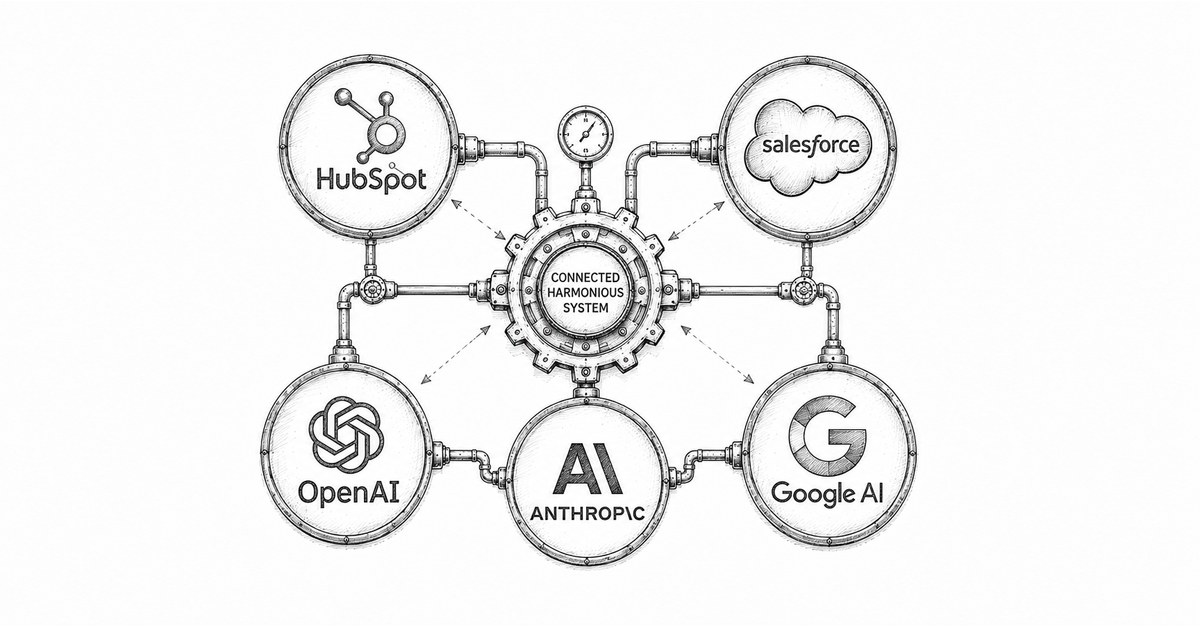
The problem is the white space between the boxes on the diagram.
The numbers are blunt about this. In MarTech’s 2025 State of Your Stack survey, roughly two-thirds of marketers (65.7%) named data integration as the single biggest challenge in managing their martech stack - ahead of cost, ahead of skills, ahead of everything. Nearly a quarter flagged data silos as a top concern. And this is happening against a backdrop of relentless sprawl: Scott Brinker’s 2025 landscape counted 15,384 martech tools, up 9% in a year, with most of the new arrivals AI-native.
So the modern stack is not short of capability. It is short of connective tissue. Every tool you add is another box that needs to talk to the others, and the talking is where it breaks. This is the same structural problem we wrote about in The Unsexy Truth About Business Automation - the value is rarely in the shiny new system, it is in making the systems you already own work as one.
What Does Bad Integration Actually Cost You?
It costs you the thing you bought the CRM for in the first place: a single, trustworthy version of the truth.
When HubSpot and Salesforce hold two slightly different versions of the same account, your team stops trusting both. Marketing reports one pipeline number, sales reports another, and the quarterly review becomes an argument about whose spreadsheet is right rather than a decision about what to do next. We unpicked exactly this failure mode in the RevOps Reality Check: most “alignment” problems are really data and process problems wearing a strategy costume.
The data-quality numbers are sobering. Validity’s State of CRM Data Management 2025 found that 76% of organisations admit less than half their CRM data is accurate and complete, and 37% have lost revenue as a direct result of poor data quality. The CRO Club puts the mechanism plainly: poor CRM record-keeping causes deficient pipeline visibility and inaccurate forecasting. In other words, the cost of a bad join is not abstract. It is a forecast your board cannot rely on.
This is the “tool sprawl tax” - paid in lost deals, wasted rep hours, and decisions made on numbers nobody fully believes. It is also exactly the kind of expensive, invisible drag that makes leaders conclude their martech investment “is not working”, when the tools are fine and the plumbing is not.
Why Does This Matter Even More Now You Are Adding AI?
Because AI does not clean your data. It launders it.
Feed a language model a messy, half-duplicated CRM and ask it to score your leads, and it will not flag the mess. It will produce a confident, fluent, plausible-sounding answer built on the bad data underneath - which is far more dangerous than an obvious error, because it looks right. We made this case in detail in AI Tool Use: Bye Bye Hallucinations: tool-equipped AI is only as good as the systems it reaches into.
The market is already learning this the hard way. Gartner found that half of organisations lack the technical and data-stack readiness to deploy AI agents at all, and that 45% of martech leaders say the vendor-sold AI agents they have piloted simply do not meet expectations. Gartner goes further still, predicting that over 40% of agentic AI projects will be scrapped by the end of 2027, citing unclear value and inadequate foundations. A good chunk of that failure is not the AI. It is AI bolted onto disconnected, dirty data and asked to perform miracles.
There is a reason the industry has quietly coined the term agent washing - vendors rebranding the same old chatbot as an autonomous agent. The way to not get caught by it is unglamorous: get your integration and data layer right first, so that when you do add AI, it has something solid to stand on. The urgency is real - we argued the case for moving now in When, Not Whether - but moving fast and building on sand are not the same thing.
What Are Your Actual Options for Connecting HubSpot, Salesforce and AI?
There are four. Not forty. Most of the confusion in this market comes from vendors describing one of these four as if it were a category of its own.
| Approach | What it is | Best for | The catch |
|---|---|---|---|
| Native connector | HubSpot’s built-in, bidirectional Salesforce sync | Most mid-market teams: a reliable lead and contact bridge, no code | Record and field-level only; thin on custom objects; needs ongoing RevOps care; advanced mapping sits behind a paid tier |
| Direct API | Custom code written against each platform’s API | One bespoke requirement a dev team can own | You own all of it - build, maintenance, auth, rate limits and every schema change that breaks it |
| iPaaS / middleware | A hub (n8n, Workato, Tray, Zapier, Boomi, MuleSoft) wiring many tools together | Connecting three or more systems without custom code | Recurring cost that scales with volume; someone still has to own and maintain the flows |
| Warehouse + reverse-ETL | Land everything in Snowflake or BigQuery, push clean data back out (Census, Hightouch) | A clean central layer to run AI and analytics on | Highest lift; needs data-engineering skills; mostly batch, not real-time |
A few honest notes the brochures skip. The native connector is where the overwhelming majority of mid-market teams should start, and where many should stop - but its advanced field mapping typically requires a paid HubSpot tier, so check what you are actually entitled to. Direct API work is seductive and rarely worth it: unless you have a requirement the other three genuinely cannot meet, you are signing up to maintain software forever. An iPaaS is the pragmatic workhorse for a multi-system stack, and the one we most often reach for is n8n - it is open-source and can be self-hosted, so you own the workflows and the data outright rather than renting them by the task, which fits the way we think about owning your stack. And a warehouse with reverse-ETL gives you the cleanest AI foundation of the lot, at the cost of needing a warehouse and the skills to run it - and the quiet caveat that most syncs run in batches, so it is the wrong choice if you need a sales trigger to fire in real time.
So Which One Should You Choose?
Match the approach to your situation, not to the loudest vendor. The decision is simpler than it looks.
- Just bridging HubSpot and Salesforce? Use the native connector. Resist the urge to over-engineer.
- Connecting several tools with light AI workflows, and no dev team? Use an iPaaS - we favour n8n for an owned, self-hostable platform; Zapier for the simplest jobs; Workato or Tray when the logic gets gnarly.
- Have one bespoke need and engineers to own it? A direct API build is justified. One. Not as your default.
- Want a clean central data layer to power AI and analytics, and have the data skills? Stand up a warehouse with reverse-ETL.
And the part nobody tells you: most real, mature stacks combine these. A native connector for the core CRM sync, an iPaaS such as n8n for orchestration across the rest, and a warehouse with reverse-ETL feeding the analytics and AI layer. The skill is not picking one religion. It is knowing which job each tool is actually good at - the same discipline that separates the 55% of AI projects that work from the rest, as we covered in Why 45% of AI Marketing Tools Fail.
What Is the Right Order to Integrate In?
This is the actual playbook, and the sequence is the whole game. Get the order wrong and no amount of tooling saves you.
- Name your system of record. Decide, before you connect anything, which platform owns which object. Salesforce owns the opportunity; HubSpot owns the marketing engagement - or whatever split fits your business. Two systems both claiming to own “the contact” is how you manufacture conflict.
- Clean before you connect. Deduplicate, standardise your fields, and agree what each one means. Syncing dirty data faster just gives you dirty data in two places. This is dull, it is unglamorous, and it is the step that determines everything downstream.
- Map the fields deliberately. Decide exactly which fields flow, in which direction, and what wins in a conflict. An inclusion list - only the records and fields that genuinely need to sync - beats “sync everything” every time.
- Connect the core, then watch it. Turn on the native sync for the core objects first. Monitor it for a fortnight. Fix the mapping errors that surface before you build anything on top.
- Add orchestration only where it earns its place. Now bring in an iPaaS for the genuine multi-system workflows - lead routing, enrichment, the journeys that touch four tools.
- Add AI last, on clean foundations. With a trustworthy data layer underneath, this is where AI stops being a gamble. Start read-only - an agent that surfaces insight rather than changing records - and earn the right to give it write access, exactly as we argued in Empower, Don’t Replace.
You will notice AI is step six, not step one. That is not caution for its own sake. It is the difference between an AI layer that compounds your advantage and one that quietly automates your mistakes.
What About Governance and Keeping It Clean?
An integration is not a project you finish. It is a system you run.
The stacks that stay healthy have three unglamorous things in place: a named owner for the integration (usually in RevOps, not IT), scoped permissions so each connection and each AI agent can only touch what it needs, and monitoring so a silent sync failure does not quietly corrupt your data for three weeks before anyone notices. None of this is exotic. It is the same governance you already apply to any critical system - the point is to apply it on purpose, from day one, rather than discovering you needed it after the forecast goes wrong.
What Should You Do About This?
Three concrete moves, in order.
First, draw the map before you buy anything. One page: every system, what data it owns, and where the joins are today. Most teams have never drawn this, and the gaps jump off the page the moment they do.
Second, fix the data layer before the AI layer. If less than half your CRM data is trustworthy - and for most organisations it is - that is the project. Clean, connect, then add intelligence. In that order.
Third, default to boring. The native connector and a tidy data model will serve most mid-market businesses better than an ambitious custom build they cannot maintain. Buy complexity only when you can name the requirement that demands it.
The Bottom Line
Integration is not a tooling problem dressed up as a strategy problem. It is a sequencing problem. The companies that get this right are not the ones with the most expensive stack. They are the ones who connected their core systems properly, cleaned the data underneath, and only then added the AI - so that intelligence had something solid to stand on.
The ones who get it wrong will spend 2027 wondering why their agentic AI project joined the 40% that got cancelled, while their competitors quietly halved their cost-to-serve. The tools were never the differentiator. The plumbing was.
Get the order right, and the rest is just configuration.
Untangling this - the right approach, the right tools, and the right order to do them in - is the kind of work Aandai does with mid-market teams every week. If your stack is starting to creak, book a discovery call and we will help you work through it.
Frequently Asked Questions
What is the best way to integrate HubSpot and Salesforce?
For most mid-market teams, the native HubSpot-Salesforce connector is the right starting point - it gives you a reliable, bidirectional contact and lead bridge with no code. Reach for an iPaaS like n8n or Workato only when you are wiring in a third, fourth or fifth system, and for direct API work only when you have a genuinely bespoke requirement and a development team to own it.
Why do martech integrations fail?
Most integrations fail for the same reason: the data underneath them is poor, and nobody owns the join. The connector is rarely the problem. Mismatched fields, duplicate records and unclear ownership are what turn a sync into a source of two contradictory versions of the truth. Fix the data and assign an owner before you blame the tool.
Should I connect AI to my CRM before or after fixing data quality?
After. Always. AI on bad data does not fix the data - it launders it, turning a messy spreadsheet into a confident, plausible-sounding wrong answer. Gartner found half of organisations lack the data readiness to deploy AI agents at all. Clean and connect first, then add intelligence on top.
What is iPaaS and do I need it?
iPaaS - integration platform as a service - is middleware that sits between your tools and orchestrates the flow of data between them. n8n, Workato, Tray, Zapier and Boomi are common names - we tend to favour n8n, which is open-source and can be self-hosted, so you own the workflows and the data rather than renting them by the task. You need it when you are connecting three or more systems and do not want to build and babysit custom code. For a simple two-tool bridge, you usually do not.
What is reverse-ETL and when is it worth it?
Reverse-ETL lands all your data in a cloud warehouse like Snowflake or BigQuery, treats that as the single source of truth, then pushes clean data back out into your operational tools (Census and Hightouch are the leaders). It gives you the cleanest possible foundation for AI - but it needs data-engineering skills and most syncs are batch, not real-time. Worth it for data-mature teams; overkill for everyone else.
How long does a HubSpot-Salesforce integration take?
A native connector can be live in days. The honest answer is that the integration is not the slow part - cleaning and mapping the data is. A team with tidy records and clear field definitions moves fast. A team with years of duplicate, half-filled records should budget weeks, because that clean-up is the work that actually determines whether the integration is useful.
References
- MarTech - 2025 State of Your Stack Survey (integration the top challenge, 65.7%), April 2025
- Scott Brinker - 2025 Marketing Technology Landscape: 15,384 tools, May 2025
- Validity - The State of CRM Data Management 2025 (76% under half accurate; 37% lost revenue), July 2025
- The CRO Club - Turn Insights Into Action With Automation and AI, June 2025
- Gartner - 45% of martech leaders say vendor AI agents fail expectations; 50% lack data readiness, October 2025
- Gartner - Over 40% of agentic AI projects will be cancelled by end of 2027, June 2025
- The State of Martech 2025 - 56% integrated with a cloud data warehouse, May 2025
Marc Price is the founder of Aandai, a B2B automation and AI consultancy helping mid-market businesses achieve more with less. With 24+ years in B2B technology marketing and web development, Marc specialises in connecting legacy systems, eliminating manual processes, and implementing practical AI solutions that deliver measurable ROI. Aandai designs and integrates AI-powered revenue operations stacks for mid-market B2B - enterprise capabilities without enterprise overhead.